MACROVERSE 42
The Wired Atelier
GLSL / ISF shader lab · cloud + desktop VJ · WebXR audience & controller · participatory gig sessions · LAN bridge · Resolume Wire pipeline
Live shader demo
move your cursor to warp the field · ~ opens the live GLSL editor
run it in Macroverse — bind every slider to MIDI faders or OSC · expose hidden uniforms & numeric literals · pipe in audio FFT · watch it react
broken shader? the LLM repair chain fixes it: regex → Ollama → AI · A/B deck · crossfader · shader carousel with thumbnails · startup splash shows VJ + audience QRs · gig sessions (stream QR + co-VJ join) · WebXR VR on Quest/headsets (audience dome or VJ controller) · tag · search · perform your whole library · export to Wire on desktop
Origin story
MacroVerse began at Melbourne Fringe — MacroVerse as a live sonic and visual interpretation of the evolution of the universe — from energy stasis to heat-death dissipation. Reductionist (Nick Wilson) performed on battery-powered micro-instruments; Aday (Adrian Richardson) ran live video projection improv that bent time and energy flow. Both are longtime Clan Analogue artists; the show ran at Abbotsford Convent’s experimental art program — we had an hour-long performance session for a week.
A full AV recording from the performances will be available in the future. Nick is working on his EP — news coming soon.
Three ways in
Standalone VJ Tool
Browse and perform your full GLSL/ISF library. A/B crossfader, mix modes, shader carousel, MIDI/OSC, Roli Lightpad LED blocks. Cloud or desktop. MJPEG / Spout / NDI on desktop.
Participatory & multiplayer VJ
Optional. Audience stream QR drives mouseX/mouseY; co-VJ join link syncs the full desk; WebXR VR on Quest.
Resolume Wire Pipeline
Desktop / self-host. Wire compatibility, expose literals as ISF sliders, fix chain, push to Resolume Wire. Cloud: Clipboard to Wire.
Settings → VJ Show Session ID → Apply. Splash shows VJ + audience QRs on load.
Pipeline demos
.wire → Resolume. One binary, no installer.your whole library, live — search it, tag it, perform it — or open the room to the audience
// this is the GitHub showcase page — the live runtimes above serve the actual app
Deploy lanes
Live probe snapshot — semver, git SHA, deploy age, and feature set per lane. Refreshed when this showcase deploys; ages tick every minute in your browser.
Changelog
Stable semver lines. Full history: changelog.md on GitHub.
WebXR / VR VJ
Scan a VR link from the VJ deck QR panel or open vj-vr.html on a Meta Quest (or any WebXR browser). The host desk still renders the mix; VR clients subscribe to the same signed gig session.
Audience VR
SSE stream of the live A/B mix inside WebXR.
vj-vr.html?remote=1&viewToken=…- Optional
&role=audience - Default: immersive 360 dome; flat screen via
&mode=screen - With Audience participation on: touch/drag steers
mouseX/mouseYonly
VJ controller VR
Full remote desk over WebSocket; host still renders the mix.
vj-vr.html?role=vj&remote=1&controlToken=…&viewToken=…- Crossfader, deck clips, mix mode, Auto VJ on/off and BPM
- Live GLSL push to host (
vj:shader-live) - Immersive WebXR + DOM overlay HUD; exit without stopping outputs
QR panel shortcuts
VJ deck → show QR panel:
- Copy VR audience — dome stream link
- Copy VR VJ — controller link with tokens
- Flat stream stays
vj-output.html(Pi HDMI / OBS unchanged)
Works on cloud lanes (live, test, aday). Quest Browser or any headset with WebXR immersive-vr. Shaders authored as flat 2D GLSL are mapped onto the dome; true ray-marched 360 content looks best inside the sphere.
Cloud edition vs desktop / self-host
macroverse.aday.net.au runs the full shader lab, VJ deck, gallery, and gig collaboration in the browser. The server library is read-only — your edits, tags, favorites, and new shaders save in IndexedDB in this browser until you export them from Settings.
Works on cloud (hosted)
Preview, Code, Split, VJ, Gallery views · A/B deck, crossfader, mix modes, Auto VJ (shader swap + depth motion toggles) · MIDI / OSC / FFT in the browser (Web MIDI, Web Audio) with AKAI/APC performance mapping · Gig sessions: audience stream QR, co-VJ WebSocket sync, audience touch X/Y · WebXR VR: audience dome + VJ controller (vj-vr.html) · Shader fix chain (pattern fixes on server) · Expose, Clipboard to Wire · Command palette, mobile bottom bar · Startup splash with VJ + audience QRs · VJ shader carousel (thumbnail browse above decks) · Export browser-local edits (Settings JSON backup).
Desktop / self-host only
Pipeline and Wire Hub tabs (batch .wire generation, Avenue .avc, Resolume push) · Spout / NDI / MacroCam MJPEG video output · Cursor IDE, Explorer, Notepad, cursor-agent terminal integration · Git scan/rescan, NUKE, Hard Reset, in-app Update (pull + rebuild) · Full disk save + auto git-commit on Save · Ollama / Cursor fix chain with local agents · Refactor / Vibe (AI tokens) toolbar buttons · Native path picker and folder scan.
Run the Go binary next to your shader folder on Windows, or pull the Docker images and compose stack from GitHub for a private hosted instance with MACROVERSE_HOST_MODE=desktop if you mount local shaders and want the full pipeline.
LAN bridge agent (Ableton Link + venue clock)
The optional macroverse-bridge-agent/ Node service runs on a Raspberry Pi or any LAN machine at the venue. It connects to the same cloud (or self-hosted) Macroverse session over WebSocket and bridges the local subnet to browsers that cannot see Ableton Link directly.
What the bridge does today
Ableton Link sync — reads BPM, beat, and bar from Link on the LAN and publishes bridge:clock:state to every browser on the gig session (Auto VJ beat clock, synced tabs). HDMI helper — logs the signed vj-output.html URL for Pi kiosk. WebSocket bridge role — authenticated via POST /api/bridge/token. Full operator docs: docs/BRIDGE.md in the repo.
OSC (planned)
The bridge advertises an osc capability in its hello handshake; LAN OSC relay is stubbed today. Browser OSC Listen (UDP to the Macroverse host) works on desktop. For cloud VJ, map MIDI in-browser or use a co-VJ laptop with the collaboration link.
# Pi quick start (after minting bridge token in Settings / API):
cd macroverse-bridge-agent && npm install && npm run build
# ~/.macroverse/bridge.json — cloudUrl, token, sessionId, linkEnabled: true
npm start
Self-host (source, Docker, images)
Everything needed to run your own lane is in
github.com/aday1/macroverse.aday.net.au:
Go API, Vite frontend, docker-compose.yml, nginx edge config, and CI that publishes
ghcr.io/aday1/macroverse.aday.net.au/macroverse:live (and :dev, :aday).
Single binary (simplest)
Download a release binary or go build from api/. Drop next to your shader folder. Open http://localhost:8765. Full desktop mode by default on Windows.
Docker Compose (Linode-style)
docker-compose.yml runs nginx + macroverse_live / macroverse_test / macroverse_aday containers. Set env vars, mount shader volumes, use nginx/conf.d/sites.conf for TLS and basic auth. See ops/ scripts for DNS, passwords, and deploy.
# Build from source:
git clone https://github.com/aday1/macroverse.aday.net.au.git
cd macroverse.aday.net.au/api
go build -o ../Macroverse42 .
cd .. && ./Macroverse42
Pre-built desktop binaries: GitHub Releases. This showcase page is published from the docs/ folder via GitHub Pages on push to main.
Live demo loops
Six short loops covering the core feature areas. Procedural placeholders rendered with ffmpeg — the live app draws real WebGL shaders.
.wire → Resolume. One binary, no installer.
Loops are deterministic procedural placeholders generated by docs/videos/build-videos.sh.
Re-run it any time to rebuild — ffmpeg mandelbrot, life, and cellauto sources, capped at ~1.5 MB each.
For the real renderer in motion, hit the live app.
Quick start
# Download a release binary, put it in your shader folder, run:
.\Macroverse42.exe          # Windows
./Macroverse42             # Linux / Mac
# open http://localhost:8765
# Or build from source:
git clone https://github.com/aday1/macroverse.aday.net.au.git
cd macroverse.aday.net.au/api
go build -o ../Macroverse42 .
cd .. && ./Macroverse42
Features
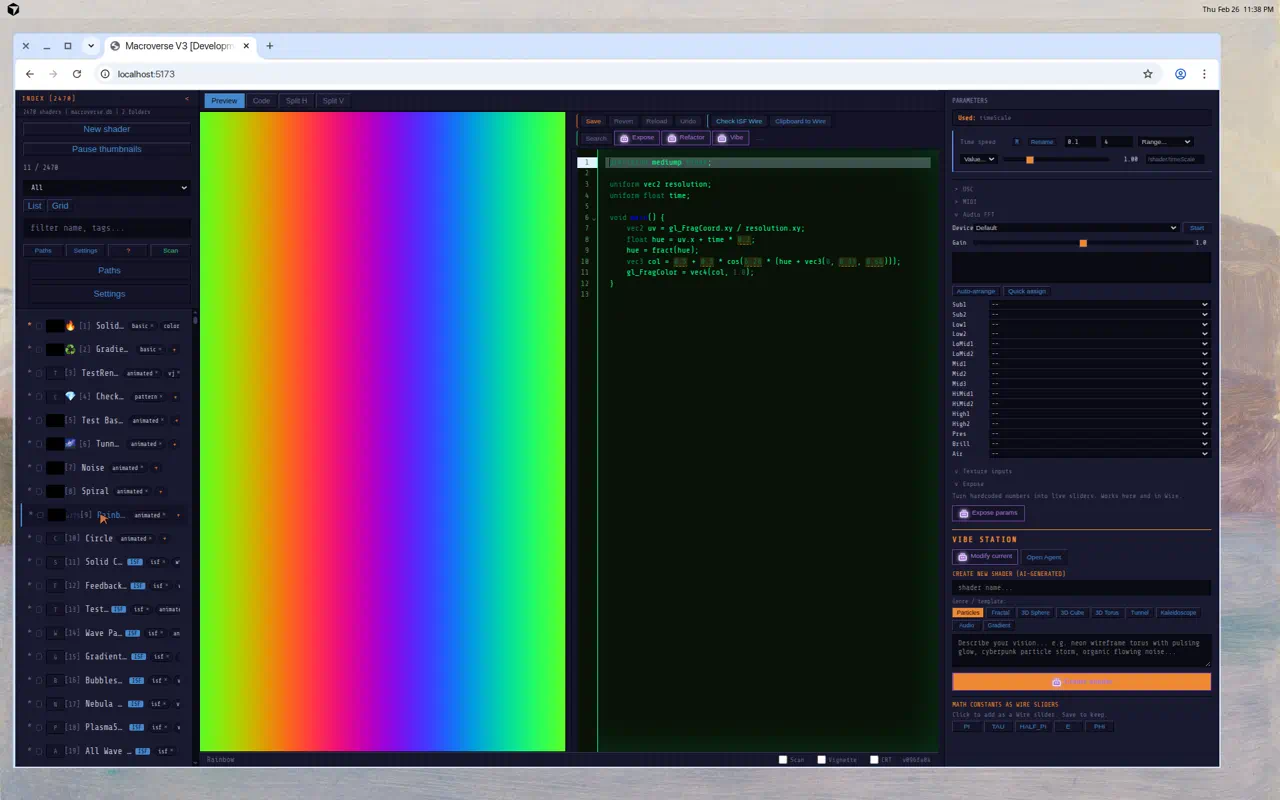
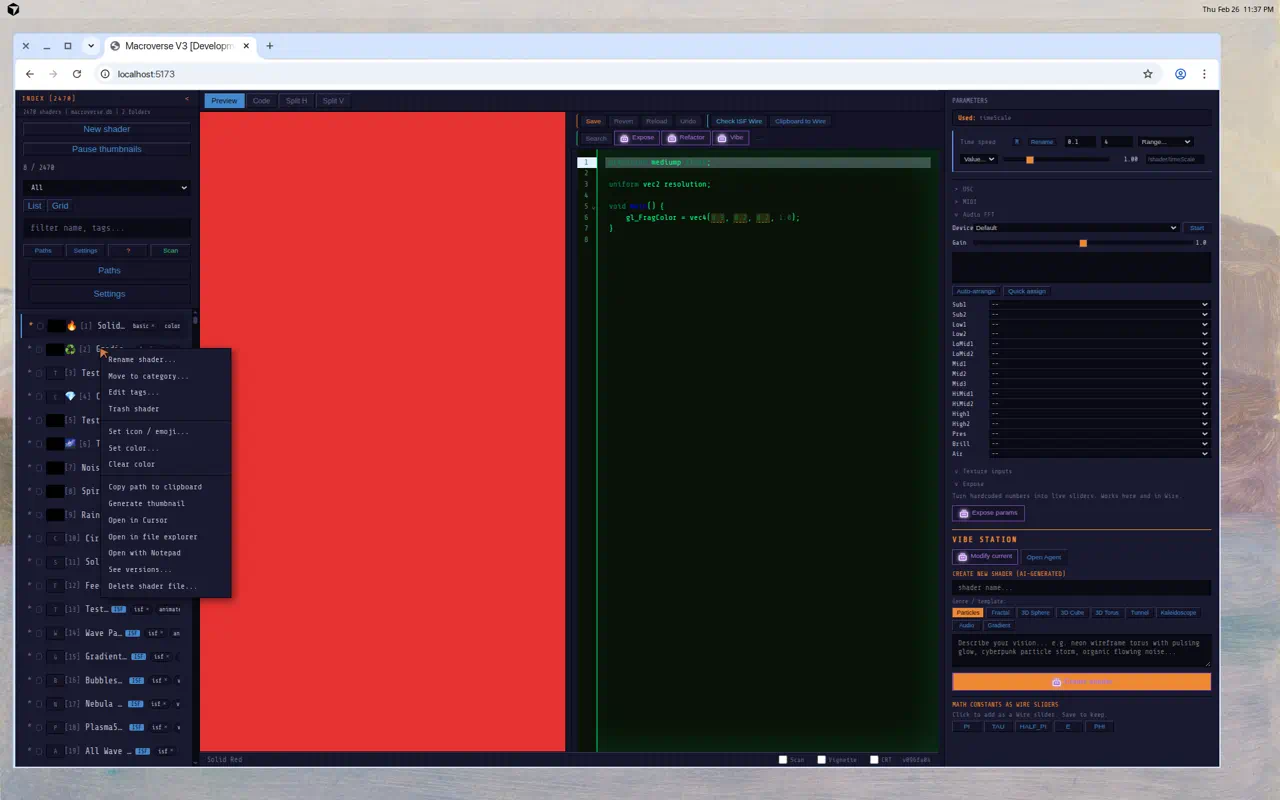
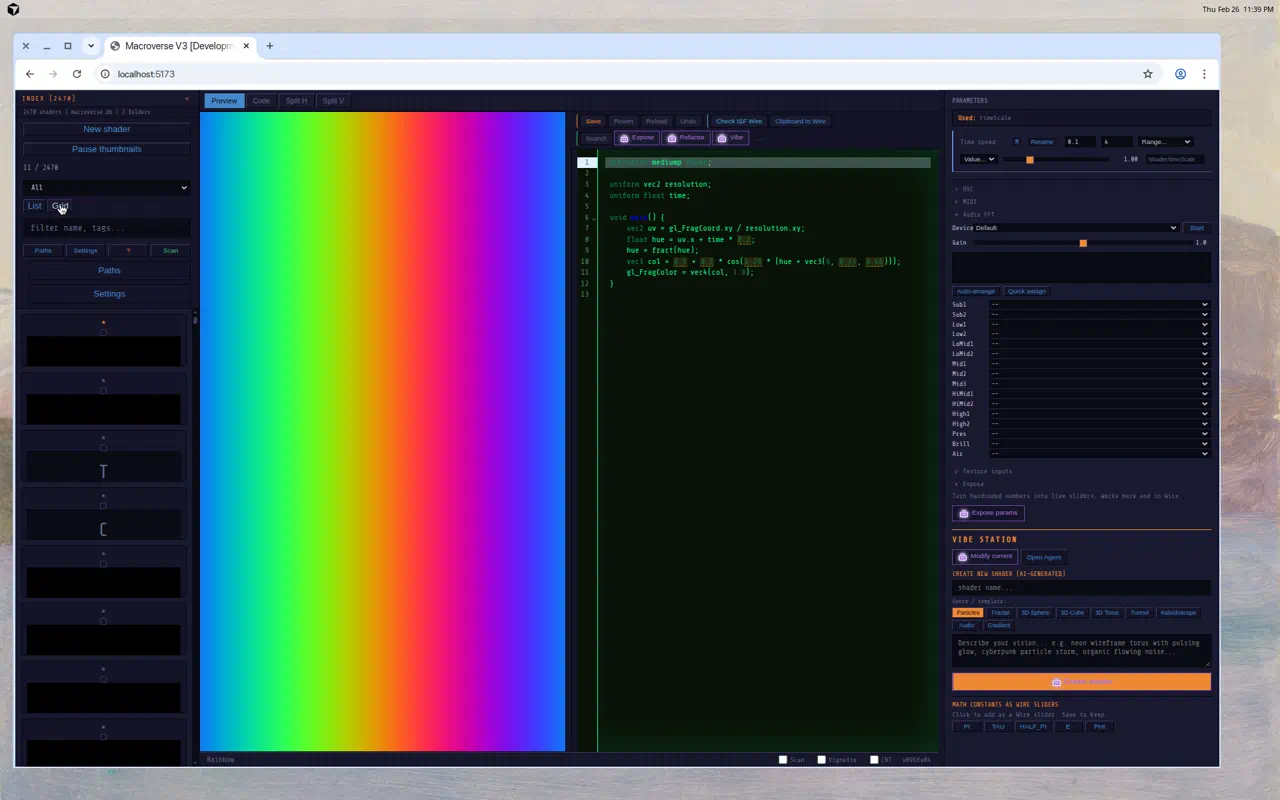
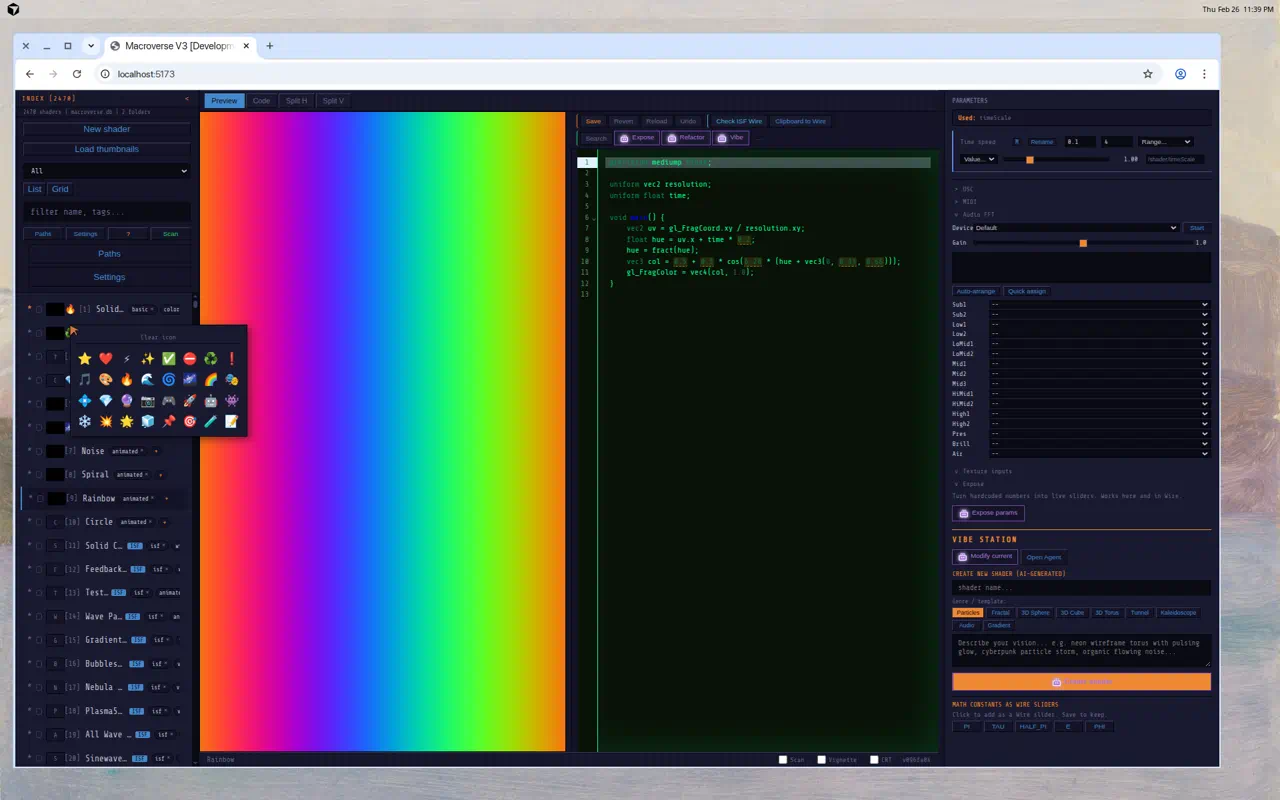
Screenshots
Live screenshots of the desktop UI. See the Demo loops section above for procedural feature loops.
Help, Keyboard Shortcuts & Feature Reference
A comprehensive tour. Mirrors the in-app Help modal (Settings » ? Help button).
1. Getting started
| 1. | Click a shader in the index list (left panel) to preview it. |
| 2. | Use the view tabs (Preview / Code / Split / VJ / Gallery; Pipeline / Wire on desktop only). |
| 3. | Adjust parameter sliders in the right panel. |
| 4. | Click Save (or Ctrl+S) to persist. On cloud, saves go to IndexedDB in this browser; on desktop, writes disk + optional git commit. |
2. View tabs
| Preview | Live WebGL render of the current shader. Right-click for output options (Spout/NDI on Windows, browser fallbacks elsewhere). |
| Code | GLSL editor with syntax highlighting, gold dashed underlines on exposable literals (sweet spots), Ctrl+Z undo. |
| Split | Side-by-side or stacked code + preview (configurable in Settings → Default View). |
| VJ | A/B deck mixer: Decks A and B with crossfader, mix modes (Crossfade / Alpha Layer / Add / Multiply), Auto VJ cycling, MIDI/OSC, pop-out output. |
| Gallery | Live grid of every cell running its own shader. 1, 4, 8, 14, 24-cell layouts. Full keyboard navigation. |
| Pipeline | Desktop only. Signal-flow diagram: shader source → backend → renderer → ISF → Wire export. Hidden on macroverse.aday.net.au cloud. |
| Wire Hub | Desktop only. Check ISF Wire, Clipboard to Wire, push to Wire, batch export. Hidden on cloud hosts. |
3. Top app bar
| Logo (M42) | Opens Settings panel. |
| Shader name | Current loaded shader. A copper dot appears when there are unsaved changes. |
| View dropdown | Mirrors the .view-tabs strip - useful when the strip is hidden on phone. |
| Last build | Build date + git short-SHA from /api/version. Hidden under 900px. |
| Save (disk) | Saves current shader; flashes when dirty. |
| Palette (>_) | Opens the command palette. Same as Ctrl+K. |
| Hamburger | Opens the More sheet (mobile) or Settings (desktop fallback). |
| VJ session chip | Tap VJ in the top bar for session name, collaboration QR, and copy link (controlToken). Audience stream QR also on startup splash, VJ output, and Settings. |
4. Mobile bottom tab bar
Visible automatically on viewports under 640px. Five fixed tabs:
| Library | Toggles the left dock (shader index). |
| Preview | Switches to Preview view (or Split if currently in Code). |
| Code | Switches to Code view, closes side docks. |
| Params | Toggles the right dock (parameter sliders). |
| More | Opens the More sheet: VJ deck, Gallery, Split view, Commands, Settings, Help. Pipeline / Wire Hub listed on desktop only (hidden on cloud). |
5. Command palette
| Open | Ctrl+K or Cmd+K — toggles the palette open/closed. |
| Quick open | / when no input is focused (Slack/Discord style). |
| Navigate | Up / Down to move, Home / End for first/last. |
| Run | Enter to execute selected command. |
| Close | Esc or click outside. |
| Categories | Editor · Parameters · Wire · External · View · App · Display effects · Panels. |
6. Gallery shortcuts
7. Preset VJ Sets (Shift+1 – Shift+9)
Hit Seed VJ Sets in Gallery to auto-assign shaders to all 9 sets by name/format heuristics.
8. Common actions
| Preview shader | Click it in the list, or drag and drop on the preview / code area. |
| Search | Type in the filter box: name, tags, category, format. |
| Rename | Double-click name, or right-click → Rename. |
| Move category | Right-click → Move to category. |
| Add tags | Click + next to tags, or right-click → Edit tags. |
| Trash / restore | Right-click → Move to trash. Show/hide trash via the trash badge. |
| Mark dead | Auto-fix gives up → tagged DEAD. Show/hide via the dead badge. |
| Sets | Manage sets, filter by set, rename / remove via the Sets menu. |
| List views | List · Compact · Grid (with thumbnail previews). |
| Version history | Right-click → See versions → click any to revert. |
9. Expose parameters & Wire export
| Expose (instant) | Click Expose in the code toolbar. Regex-based literal detection. Local-first, zero tokens, zero latency. |
| Search params | Click Search. Popover lists every literal + named value. Click Expose next to any to make it a slider. |
| Sweet spots | Gold dashed underlines in the code = exposable values. Right-click one to expose just that literal. |
| Refactor (AI) | Refactor button: deeper LLM-based discovery and structural improvements via Ollama or Cursor. |
| Visual modify (Vibe) | Vibe sends screenshot + your description to the AI agent (Cursor or GitHub Copilot variant). |
| Format written | uniform float name; // @expose min max — emitted into the ISF JSON block as well. |
| Check ISF Wire | Validates ISF block compatibility with Resolume Wire (params, sampler2D handling). |
| Clipboard to Wire | Copies the ISF (with INPUTS array, useFrameIndex toggle, fps, timeScale, mouseX/Y) to the system clipboard for paste into Wire. |
| Texture handling | sampler2D uniforms become ISF image INPUTS; texture2D() rewritten to IMG_NORM_PIXEL(). |
10. Vibe Station (create new shaders)
| Modify current | Screenshot + your prompt → AI rewrites the active shader. |
| Create new | Pick a name, choose a genre, optionally describe the vision. Click Create. |
| Genres | Particles · Fractal · 3D Sphere / Cube / Torus (raymarched SDFs) · Tunnel · Kaleidoscope · Audio · Gradient. |
| 3D objects | 3D genres scaffold a real raymarcher with SDF helpers in a single fragment shader. |
11. VJ deck
| Open | Click the VJ tab. |
| Startup QRs | Loading splash shows VJ collaboration and Audience stream QRs while the index loads. Tap splash to dismiss. |
| Shader carousel | Horizontal thumbnail strip above Deck A/B. Filter, scroll, tap A or B to load, or drag a card onto a deck. |
| Layout | Single-viewport: decks + crossfader + master preview + controls. Drag row resizers (double-click to reset). Touch-friendly on Steam Deck / phone / tablet. |
| Decks A and B | Load different shaders, tweak params independently, Prev/Next through the library. |
| Crossfader | Smooth blend between decks. Mappable to MIDI fader / OSC. |
| Mix modes | Crossfade · Alpha Layer · Add · Multiply. |
| Auto VJ | Auto-cycles shaders with configurable timing. Independent toggles for shader swap vs depth/param motion when Auto VJ is on. |
| FFT A/B | Audio FFT on each deck independently. |
| OSC A/B | OSC routing per deck. |
| AKAI/APC MIDI | VJ tab → MIDI → APC40 / Akai. Grid and scene buttons load Deck A; hold Shift and press grid/scene to load Deck B. Track knobs control Deck A params, Device knobs control Deck B params, faders follow Shift, CC14 is the crossfader, and page/bank controls move Deck A/B pages. |
| Pop-out output | Open VJ output in its own window for full-screen on a second display. Uses BroadcastChannel for low-latency sync. |
| Text templates | Built-in neon, dotmatrix, LCD, 16-segment text overlays. |
| Mouse XY pad | Drag in the preview to drive mouseX/Y uniforms. |
| Gig session (optional) | Settings → VJ Show Session ID → Apply. Salted viewToken / controlToken URLs so guessing a session name cannot hijack the show. |
| Audience stream QR | VJ deck → show QR on output. Encodes vj-output.html with viewToken (SSE stream). Watch-only unless Audience participation is enabled — then phones can touch/drag the preview to send mouseX / mouseY only. |
| Audience participation | VJ deck QR panel checkbox. Restrictive: touch X/Y on the stream preview feeds the host shader mouse uniforms. No crossfader, clips, or params. |
| Co-VJ join QR | Top bar VJ chip → collaboration QR / copy link with controlToken. Full VJ desk: WebSocket syncs crossfader, clips, mix mode, and deck params across browsers. |
| VR audience link | VJ deck QR panel → Copy VR audience. Opens vj-vr.html with viewToken. Immersive dome (default) or mode=screen. SSE mix stream; optional mouse X/Y when participation is on. |
| VR VJ controller | VJ deck QR panel → Copy VR VJ. role=vj + controlToken + viewToken. WebSocket remote desk + live shader push; WebXR enter/exit keeps host outputs running. |
| Pi / OBS output | Open vj-output.html?remote=1 on a Pi HDMI display or OBS Browser Source. Same signed stream URL as the burned-in QR. On macroverse-private, stream URLs require the same basic auth as the main app. |
12. LAN bridge agent
| Purpose | Run on a Pi or LAN box at the venue. Bridges Ableton Link (BPM/beat/bar) from the local subnet into the cloud Macroverse WebSocket session so all browsers share the same clock. |
| Setup | POST /api/bridge/token → config in ~/.macroverse/bridge.json → macroverse-bridge-agent/ (npm start). See docs/BRIDGE.md. |
| OSC | Capability advertised; LAN OSC relay is planned. Use in-browser OSC Listen on desktop Macroverse, or MIDI on cloud. |
| ArtBastard | Pair a second bridge on the same Pi with a different session ID for DMX (see ArtBastard repo DOCS/BRIDGE.md). |
13. Roliblock (multi-device, BLE / USB)
| Multi-device | N simultaneous Roli Lightpad blocks, each with independent MIDI in/out, handshake, LED buffer, and per-device settings. |
| USB auto-rig | Request MIDI auto-detects Roli USB touch/LED pairs, enables them, and defaults to Shared output / Mirror so every enabled block shows the master VJ output. |
| Deck assign | Per-device: shared / deckA / deckB / auto. Shared is the default; Deck A/B is available when you want independent deck pads. |
| Deck A/B XY | In Independent mode, a block assigned to deckA drives Deck A mouse/XY, and a block assigned to deckB drives Deck B mouse/XY. Shared output mode drives the global VJ mouse from every enabled block. |
| BLE MIDI | Web Bluetooth pairing. Device A can be BLE while Device B is USB. 250ms handshake / 80ms LED stream on BLE; 150ms / 50ms on USB. SysEx chunked for BLE MTU. |
| LED filters | Per-device contrast, brightness, saturation, gamma, grayscale, invert, posterize, channel isolation. |
| LED drawing | LED output samples the shader/output canvas and streams frames to each enabled block after MIDI output handshake. Modes include Shared output / Mirror, independent per-deck output, linked XY, and stretched 30x15 split across two blocks. |
| Stretched mode | Sample 30x15 from the output canvas, split left/right to two devices for a wide LED display. |
| Debug page | Dual-device debug with independent shaders, mouse XY pads, WebGL preview, and per-device LED stream. Library cycling: Prev / Next / Random / Auto. |
| View modes | A Only · B Only · Both (default) · Combined (30x15 side-by-side LED preview). |
| Background render | LED streaming continues when the browser tab is hidden (setInterval fallback). |
14. External controls
| OSC Listen | Right panel → OSC → set port, click Listen. Send UDP messages to /shader/<paramName>. |
| MIDI Learn | Right panel → MIDI → Enable. Click Learn next to any param, then move a CC knob. |
| VJ MIDI template | VJ tab or Settings → MIDI / OSC - VJ controller. APC40 / Akai loads the default performance map; Custom keeps learned mappings. |
| Audio FFT | Right panel → Audio → Start. Map frequency bands (Sub-Brilliance) to params. |
| Texture inputs | Right panel → Texture inputs → Add sampler2D → Webcam or Image. |
| Webcam input | Right panel → Texture inputs → Webcam. Resolume Avenue / OBS can chain to this. |
15. Output & streaming
Desktop / self-host only for Spout, NDI, and MacroCam MJPEG. Cloud VJ uses browser pop-out and vj-output.html SSE stream.
# MJPEG stream (MacroCam) for OBS Browser Source:
http://localhost:8765/api/output/macrocam/stream

# Linux virtual webcam (requires v4l2loopback):
ffmpeg -i http://localhost:8765/api/output/macrocam/stream -f v4l2 /dev/video0

# Spout / NDI: right-click the preview canvas (Windows / where supported)
16. Display effects
| Scanlines | Scan in status bar (or effects.scanlines in palette). Horizontal scan-line overlay on preview. |
| Vignette | Vignette in status bar. Darkens preview corners. |
| CRT code | CRT in status bar. Phosphor glow on the code editor. |
| Full screen | Full Screen in status bar, or F11. |
| Theme | Settings → HSV sliders for full theme customisation. Light theme preset available. |
17. Update button
Desktop only — hidden on cloud hosts.
| Background check | 5 seconds after launch the app silently runs git fetch + git log HEAD..origin/HEAD. |
| Indicator | If the remote is ahead, the toolbar Update button turns amber and shows Update (N). |
| Apply & Restart | Click Update → modal lists incoming commits → Apply & Restart writes a temp script that runs git pull origin + build.bat / build.sh, launches the new binary, and exits the current process. |
| Cross-platform | Windows uses build.bat, Linux/macOS uses build.sh. Gracefully no-ops outside a git repo. |
18. Settings reference
| Browser-local edits | Cloud: Settings → export/import JSON backup of IndexedDB overrides (tags, code edits, favorites). Clear local store to revert to server library. |
| Source paths | Desktop: Add / remove folders to scan. Default: shaders/ next to the binary. |
| LLM Provider Chain | Local regex → Ollama → Cursor. Enable / disable / reorder per provider. Per-provider model + endpoint config. |
| Hard Reset (git) | Zips the configured target folder, then restores it from the first git commit on main. Target path configurable in Settings → Hard Reset Path. Always creates a timestamped .zip backup first. |
| NUKE | BACKUP the index → CLEAR all DB tables → RESCAN every source path. Files on disk untouched. |
| READONLY / cloud | Hosted lanes set MACROVERSE_HOST_MODE=cloud. Server writes blocked; local browser store enabled. Pipeline / Wire / video output / shell agents disabled in UI. |
| DEMO_BANNER | Set DEMO_BANNER=true for the persistent orange "Read-only demo instance" banner. |
| Default view | Preview / Code / Split V / Split H / VJ. Persists across sessions. |
| Mobile / Desktop | Status-bar toggle to force-mobile CSS on any device. Persisted to localStorage. |
| Graveyard log | unrecoverable-shaders.json next to macroverse.db. Path shown in Settings. |
19. Master keyboard shortcuts
| Ctrl+S | Save shader (auto git-commit if enabled) |
| Ctrl+Z | Undo in editor |
| Ctrl+K / Cmd+K | Toggle command palette |
| / | Open command palette (when no input focused) |
| F11 | Toggle full screen |
| ? | Show / hide Gallery shortcut HUD (in Gallery) |
| ← → ↑ ↓ | Gallery navigation |
| Alt+← / Alt+→ | Gallery: previous / next page |
| 1 – 9 | Gallery: toggle preset tag |
| Shift+1 – Shift+9 | Gallery: toggle preset VJ Set |
| A | Gallery: set-toggle prompt |
| F | Gallery: toggle favourite |
| R | Gallery: rename focused shader |
| Space | Gallery: toggle auto-advance |
| Right-click preview | Output options (Spout / NDI on Windows) |
| Right-click code | AI actions (Explain, Enhance, Refactor, Generate) |
| Right-click shader | Rename / Move / Tags / Trash / Versions |
| Drag & drop | Drag a shader from the list onto the preview or code area to load it |
| ~ / ` | Showcase only: open the GLSL Lab on this page |
| Triple-click title | Showcase only: open the GLSL Lab |
// live runtimes above — back to top